InstaCams Payments and Billing
Understanding InstaCams payments is easier once you know how the platform works. InstaCams billing is based on a minute-based system, which means users purchase minutes first and then use those minutes for private cam sessions. This page explains how the InstaCams payment system works, how users add minutes to their account, which payment methods may be available during checkout, and what to expect with billing, transaction records, and payment support. The goal is to give users a clear, factual overview before making a purchase, especially when planning to use minutes for private 1-to-1 webcam interactions.
How Payments Work on InstaCams
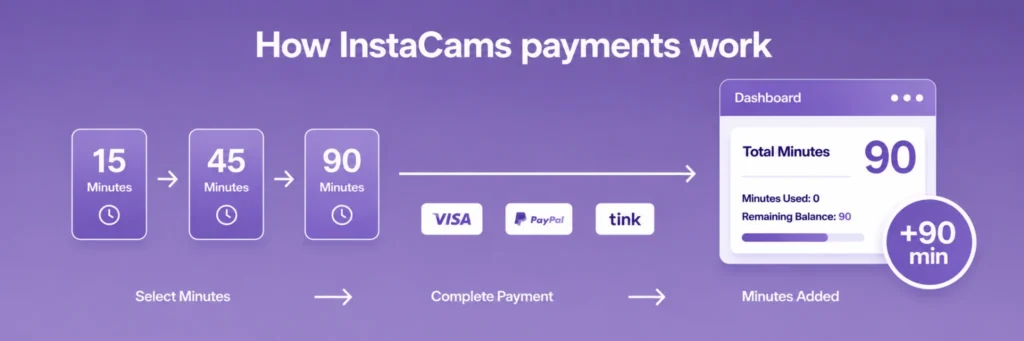
InstaCams uses a minute-based payment system rather than a simple one-click charge for every action. Users can buy minutes in advance and then use those minutes whenever they want to start chatting, or purchase them right before entering a chat. This setup separates payment from usage, so users do not need to enter their payment details every time they want to chat. Instead, minutes are added to the account first and then used during video conversations.
In practical terms, the InstaCams payment system works like this:
- You select a minute package
- You complete a one-time purchase
- Minutes are added to your account balance
- Minutes are deducted as you use the service
This makes InstaCams payments more predictable for users who want to control spending before entering a private cam session. Rather than being charged unexpectedly during use, the account draws from a pre-purchased minute balance.
InstaCams credits or subscriptions are not required. InstaCams uses minutes rather than a separate credit wallet or recurring subscription model.
Buying Minutes on InstaCams
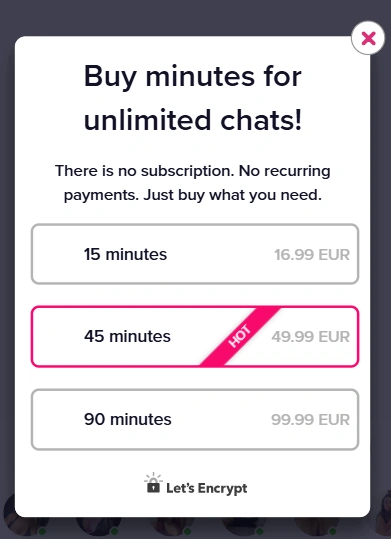
How to Purchase Minutes
If you want to add minutes on InstaCams, you need to complete a few simple steps inside your account.
Steps to purchase minutes:
- Log in to your InstaCams account.
- Open the Balance section of your account.
- Choose one of the available minute packages.
- Select a preferred payment method.
- Review and confirm the purchase.
Once the transaction is approved, the new balance should appear in the user account. Each minute purchase is processed as an individual transaction, meaning users decide when they want to buy more minutes rather than being automatically charged.
Users might expect a typical credit-based system, but InstaCams works differently. Instead of purchasing credits, your paid balance is managed directly in minutes. It’s a straightforward and simple process.
Using Minutes for Private Cam Sessions
After minutes are added to the account, they can be used for private cam activity.
Instead of a subscription or recurring billing model, users simply purchase the amount of chat time they want. InstaCams offers fixed packages such as 15 minutes, 45 minutes, or 90 minutes, allowing users to choose how long they want to stay in private video chat.
Minutes are used for video chatting on the platform. If users want more time, they can purchase additional minutes and continue the chat without changing how the payment system works.
Because minutes are deducted during use, users can monitor their remaining balance while chatting. When the available time runs out, additional minutes can be purchased to continue the private cam session.
InstaCams Payment Methods
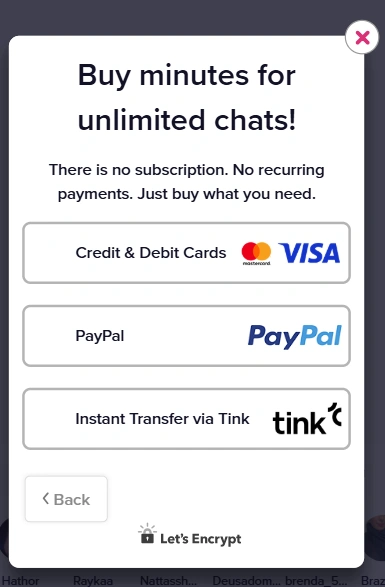
To complete a minute purchase, users must select one of the supported InstaCams payment methods available during checkout.
Common InstaCams payment options can include:
- Credit cards
- Debit cards
- Secure online payments through trusted payment processors (such as PayPal or bank-based services like Tink)
The exact payment methods available may vary depending on location, payment processors, or platform updates.
During checkout, users enter their billing information through a secure payment form. Once the payment is confirmed, minutes are added to the account and can be used immediately.
Payment Security and Privacy
Secure Payment Processing
Security is an important part of any online payment flow. InstaCams payments are handled through secure payment processing systems designed to protect billing information during checkout.
Secure payment handling includes:
- Encrypted connections during checkout
- Protected payment forms
- Standard payment processing safeguards
- Verification steps where required
This is a common setup for online platforms because it allows billing data to be handled through established payment infrastructure rather than being processed directly in a basic form.
Users should still review all payment details carefully before confirming a purchase. While secure payment systems are designed to reduce risk, it is always wise to verify the amount, account details, and selected minute package before final approval. Check out our dedicated page if you need to learn more about Safety & Security on InstaCams.
Discreet Billing Information
Some users are concerned about how charges appear on their bank or credit card statements. On many online platforms, billing descriptors may be discreet, depending on the payment processor used.
With InstaCams billing, the descriptor shown on a bank statement may vary depending on the payment system handling the transaction. Users who want to understand how a transaction may appear can review the billing information during checkout.
Payment Issues and Billing Support
Payment Declined or Failed
In some cases, users may encounter InstaCams payment problems during checkout. A declined or failed payment does not always mean there is an issue with the platform itself. It can happen for several common reasons, including:
- Insufficient funds
- Incorrect card details
- Bank restrictions on online or international payments
- Temporary verification failure
- Security checks triggered by the payment processor
If a payment does not go through, users should first review the entered billing information and try again carefully. If the issue continues, contacting the bank or payment provider may help identify whether the transaction was blocked for security reasons.
It is also useful to confirm that the selected payment method is supported in the user’s region and that the card or account is enabled for the type of online purchase being attempted.
Transaction Not Appearing
Sometimes a completed payment or new minute balance may not appear immediately. Processing times can vary depending on the payment route, verification step, or temporary delay between authorization and account posting.
If a transaction is not appearing, users should:
- Refresh the account or Balance section
- Look for a payment confirmation notice
- Wait briefly in case processing is still being finalized
- Contact InstaCams support if the issue remains unresolved
While there is no separate InstaCams billing support, users can contact InstaCams support for payment-related issues. If a payment appears to have been charged but minutes have not yet been added to the account, keeping transaction details, timestamps, and any confirmation reference can make the support request easier to review.
Managing Your Billing and Transactions
Managing InstaCams billing involves more than just making a payment. Common billing management tasks include:
- Checking bank or card statement for completed charges
- Tracking minute usage
- Checking available minute balance
- Contacting support if a payment appears to be missing
InstaCams does not provide a separate internal billing history where users can review past transactions, purchases, or payment confirmations directly inside the platform. Users who want to keep track of their purchases need to do so through their payment method records and their current account balance.
Frequently Asked Questions About InstaCams Payments
What payment methods does InstaCams accept?
InstaCams payment methods may include common options such as credit cards, debit cards, and other secure online payments offered during checkout. The exact InstaCams payment options can vary by region and payment processor. Users should check the Balance section for the most current methods available to their account.
How do I buy minutes on InstaCams?
To buy minutes on InstaCams, users need to log in, open the Balance section, choose a package, select a payment method, and confirm the purchase. Once approved, the minutes are added to the account balance.
Are InstaCams payments secure?
InstaCams payments are processed through secure payment systems that use protected checkout connections and standard payment processing practices. Third-party processors may also be involved. As with any online purchase, users should verify the payment details before confirming the transaction.
Why was my InstaCams payment declined?
An InstaCams payment may be declined because of insufficient funds, incorrect billing details, bank restrictions, or a payment verification issue. In some cases, the payment processor may flag a transaction for security review. Checking the entered details and contacting the bank can help identify the cause.
Can I see my transaction history?
InstaCams does not provide a full transaction history inside the account dashboard. Users can instead check their bank or card records for completed charges and review their account balance to confirm that purchased minutes were added correctly.
Are payments required for private cam sessions?
Private cam sessions on InstaCams require purchased minutes, so payment is required before starting 1-to-1 cam sessions. Users can purchase minutes in advance and then use them later.